SYSTEMS & PROCESSES
Healthcasts
Naming Standards · Cross-team Alignment · Root Cause Analysis · Data Quality · Cross-team LiaisonInterdepartmental Confusion to Operating Standard
The same campaigns kept getting canceled and rebuilt. Everyone assumed it was a communication problem. It was a vocabulary problem. I wrote new definitions, took them to the group, got a consensus, and the consistent reworks stopped.
THE PROBLEM
People were using the same words to mean different things. One term in particular carried a lot of weight - it decided the creative, the audience, and whether we cloned an existing campaign or built a fresh one. Every cycle we ran up against the same roadblocks:
Sends were scheduled, then canceled and rebuilt when it turned out we had different definitions for the same word
A campaign name got changed, changed back, and then changed again as the definition moved mid-thread
One audience would have been messaged that should have been left out entirely. Three sends were rebuilt to further segment, delaying the sends by multiple days
The labels on the project board, the tags in the platform, and the way we talked about the groups didn’t match each other. Figuring out which group was which meant bouncing between various sources
We confirmed the same details over and over before every send, which added confusion instead of removing it, and further pushed timelines
We all read this as people not communicating well. But it came back every cycle. Nothing was written down, so there was nothing to be consistent with.
WHAT I DID
Went back through two months of the group chat history, sorting real disagreements from a vocabulary collisions. It was usually collisions.
Found something underneath it: some of the arguments were access problems wearing a disguise. People without direct access to the email platform couldn’t check what an audience tag actually contained, so they described audiences in plain language. Then our teams had to guess between them what they meant.
Wrote six terms, each meaning only one thing. They covered audience state, where the audience came from, and incentive type. That included splitting out a category that had been lumped in with another despite having separate reporting metrics.
Took it to the group for an actual yes rather than assuming everyone was on board and pushed for a decision when the thread stalled on a vague agreement.
Wrote the deployment guide that made it usable day to day: naming, list and audience terms, deadlines, who hands off what to whom, including a few rules that had never been written down.
WHERE IT LANDED
The group adopted the terms, leadership signed off on them as the basis for tagging, automation, sending and reporting.
The guide became the group’s reference document.
The other team picked it up for something I hadn’t planned for. They used it to train their AI to QA the details the guide lays out, which closed the loop on their side.
The rework stopped. Every build in the prior period had needed some kind of cancellation or rebuild. After, none did.
The real payoff wasn’t the rework we stopped doing. It was that once each campaign type meant one thing, we could compare performance across them and know we were comparing like to like.
AUTOMATION
Healthcasts
Workflow Automation · Project Board APIs · List Prep · Platform Imports · Process DocumentionWeekly Workflow Automated Across Five Systems
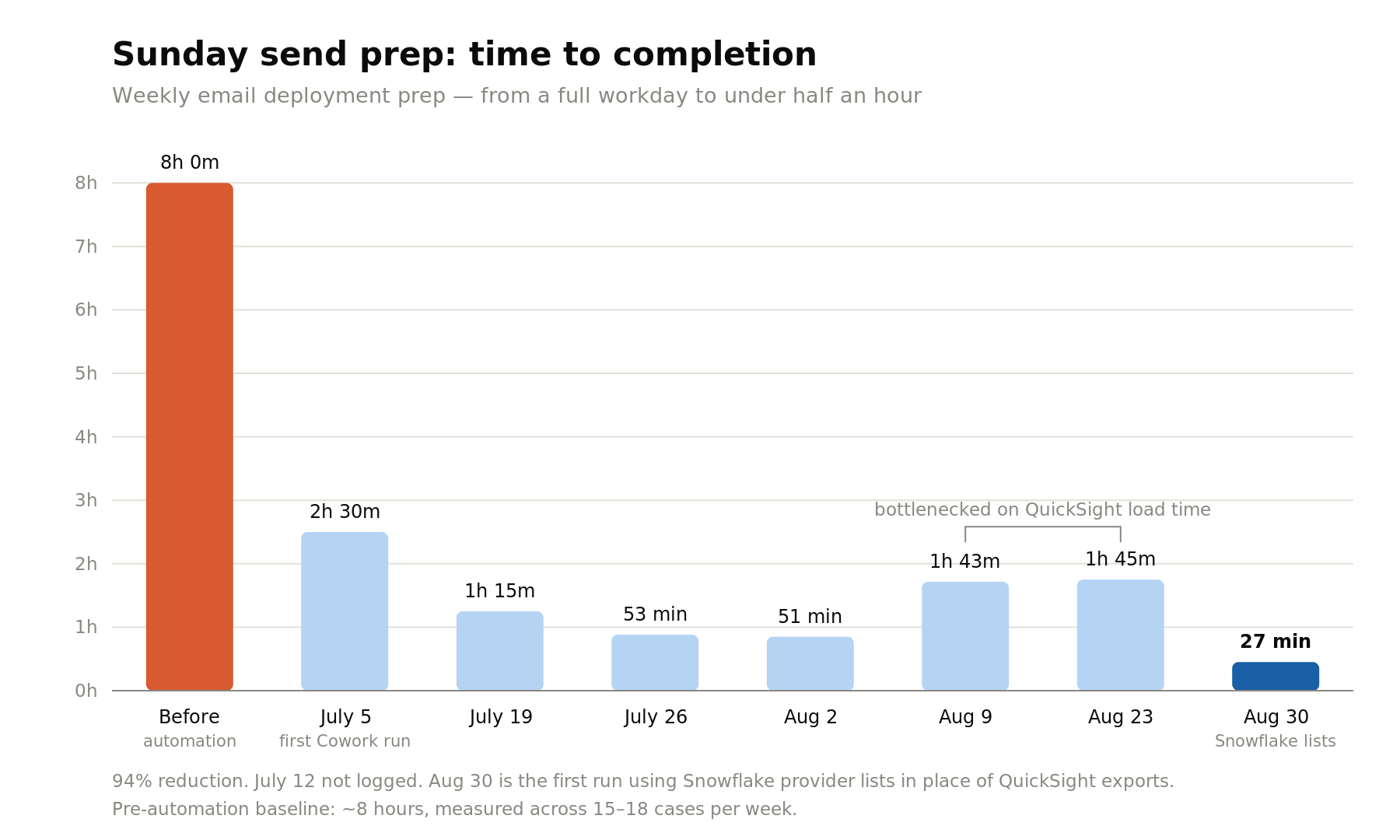
I rebuilt my weekly workflow. Sunday send prep for 15-18 cases used to take the better part of a workday. I was cross-referencing two project boards, looking up IDs, writing segments, pulling specialty lists, reshaping every file, and building folders. It now runs in 27 minutes, and most of that is me reviewing changes before they’re made.
THE CONTEXT
Every week, 15-18 cases, each needing the same long sequences:
Identify which campaigns are scheduled
Cross reference two separate project boards to retrieve the correct IDs
Write the segments
Look up per-campaign record IDs from an internal admin tool
Build the folders
Pull audience list from Snowflake
Transform each export to the ESPs import specs
Import each list with the correct tag
All by hand, roughly eight hours a week, and most of what needed knowing was in my head.
THE PROBLEM
The most obvious problem was time, which led to trying automation in the first place. But as the workflow was being built, it became clear that every failure was silent:
A wrong tag at import doesn’t throw an error, it just sends the wrong content to the wrong audience
Six case types moved through on different paths, and several skipped steps the others needed. Take the wrong path, the output still looks the same.
Worth noting: I had been executing this by hand without a single miss-send. But that held because I was careful every week, and I remembered all the exceptions. Me being reliable doesn’t scale.
WHAT I DID
Built it in pieces before I built it as a whole: Board cross-referencing, list pulling, and file prep for each list got worked out separately, on whichever tool handled that job best. This ensured that each segment ran as efficiently as possible
Made it ask before it does anything. It shows me everything it’s about to change, does a test, waits for me to confirm, and then does the rest. I explicitly told the AI not to touch certain fields.
Wrote out rules for all six case types, exceptions included, so the edge cases live in the instructions instead of my head.
Made every file identify itself. Each list now carries its case ID inside the file, and gets checked against the board before it’s written anywhere. If it doesn’t match, the file is refused rather than quietly misfiled
Kept tightening it every week rather than declaring it done. Batch writes replaced one-at-a-time writes, file prep became a script, and every new quirk got written down the week it appeared.
WHY THE SELF CHECK MATTERS
Every list carries a link that sends each physician to a specific case. A misfiled list wouldn’t look broken. It would just quietly send thousands of people to the wrong place, and nothing in the process would flag it.
Checking each file against the board before it’s used makes the failure impossible rather than unlikely. Those are different things, and the difference matters at this volume.
THE WEEKS THAT MATTERED MOST
By early August the run was down to about 51 minutes. Then two weeks came in at 1h43m and 1h45m, nearly double, with nothing in the workflow having changed.
Both were the dashboard I was pulling the lists from. Fifteen to eighteen specialty exports, each one meaning expanding, deselecting boxes, selecting new boxes, waiting for tables to reload. Thirty to sixty minutes of pure waiting every week.
WHERE THE AUTOMATION STOPS, AND WHY
One step that is still mine on purpose: uploading the segments to the email platform. It allows me to QA before anything runs on its own.
It used to be two steps, relying on two systems to work independently of each other, but built to report back what the other had done. Pulling lists meant driving a dashboard in a browser, which ran in a separate environment from everything else and needed me to carry output across by hand. Replacing the dashboard with a direct query didn’t just make the pull faster, it collapsed the whole workflow back into one place. The handoff I’d built rules around doesn’t exist anymore, which is the better outcome than making it reliable.
WHERE IT LANDED
Eight hours a week down to 27 minutes - a 94% cut. It got there in stages: 2h30m on the first full run, under an hour by late July, then 27 minutes once the dashboard was out of the picture.
Everything that lived in my head is now written down somewhere - the process is repeatable and scalable.
Somebody else could run this now. That wasn’t true before.
Still zero mis-sends, which was the bar. Faster with mistakes would have been worse than slow without them.
What’s left is mostly my own review steps, which is exactly where I want the time to go. Those seven and a half hours went back into the parts of the job that need judgement instead of file prep.
MIGRATION & TESTING
Healthcasts
Requirements Gathering · Acceptance Testing · Root Cause Analysis · Data Quality · Cross-team LiaisonNew Tool Testing and Catching an Unwitting Error
I was my team’s liaison at on a project to replace the tool we pull contact lists from. I tested it against real sends for a week, found three defects, and turned up a data problem that had been quietly deciding who got out emails for about a year. After I joined the project, my lead handed me the call on whether it was ready to replace the old system. It is. The old dashboard is off, and the whole team runs on the replacement.
THE CONTEXT
We were replacing the dashboard my team pulls contct lists from. It was expensive, it was slow, and it sat on top of a dataset that took hours to load. The plan was to rebuild the same four kinds of list pulls somewhere cheaper and faster.
I was named liaison to the data team because I pull the widest range of lists and run into the most friction doing it. My job was to say what the lists have to do, and then find out whether the replacement did it.
THE PROBLEM
The engineer building the replacement couldn’t see the tool he was replacing. He didn’t have access to it. So anything that wasn’t written down in the requirements effectively didn’t exist.
WHAT I DID
Wrote up requirements covering every list type my team uses, including peripheral cases
Handed over real test cases instead of descriptions, matched pairs of IDs and an actual upload file, including an unlabeled QA column I keep in column one that no written spec would ever capture
Screenshotted the exact settings we use for non-viewers, since describing in the written requirements didn’t work.
Tested against live sends, not sample data. All three defects turned up that way, including one I caught mid-deployment.
When something failed, pasted the exact error rather than describing it. That one was was fixed in twenty minutes.
Scoped how far a problem reach before being asked. When five lists come back empty, I checked the rest and reported that everything else was pulling fine, so nobody had to go looking.
Flagged a suspected second defect while naming the other explanation it could just as easily be. Turned out to be the same root cause, but I’de rather hand someone a maybe than a wrong certainty.
When a decision got handed back to me that wasn’t mine to make, I routed it to the person who owns it instead of just answering.
WHAT THE BIG ONE TURNED OUT TO BE
I reported the discrepancy without a theory attached: here’s where the numbers differ, I haven’t figured out why yet. I didn’t want to send someone digging in the wrong place because I’d guessed.
It came down to this: there are two places a member’s specialty gets stored. One is filled automatically when they register, based on an outside code that doesn’t always map to anything real. The other is the on they pick for themselves once they’re in. The old tool read the first. The new tool read the second.
A six figure number of records had a mismatch between the two. Roughly half of those had no real specialty on the registration side at all. Those people had chosen a specialty later, and every specialty list we’d pulled in the past year had skipped straight past them. Not sent the wrong thing, sent nothing.
So the discrepancy wasn’t the new tool getting it wrong. It was the new tool getting it right.
WHERE IT LANDED
All four list types validated against live sends over a week. Three defects found, all fixed same day. A file size limit, the wrong source of truth, and an upstream job that hadn’t run.
The replacement is now more accurate than the system is replaced, not just equivalent to it.
A recurring five-figure annual licensing cost eliminated. The old dashboard is shut off and the whole team is on the replacement.
Data delay is down from 26 hours to 6, and will be about an hour once the rest of the move finishes.
Both capability gaps closed. Non-viewers ended up simpler than the old checkbox workflow. The other was a scheduling check a teammate does. I sat down with her, built it, and we widened the scope tother once I understood what she was actually checking for.
My team lead gave e go/no-go on the migration, in front of our CTO. She kept the business decision to drop the old system. The call on whther the new one was technically ready came down to me. I gave it, and it held.
Half of these people had picked a specialty we never saw, so we’d been sending them nothing at all. The other half were getting content match to the wrong one. Fixing it meant tens of thousands of people started getting emails that actually had something to do with their work.
WHAT I’M WATCHING
The two systems fail different, and now that the old one is gone, that’s not hypothetical. The old dashboard was slow in a boring, predictable way. It was always a day behind. The new on depends on a job running on schedule, and when that job doesn’t fire you don’t get stale data, you get nothing at all.
That’s a better failure in most ways. It’s a worse one on a weekend, which is exactly when I’m prepping Sunday sends. Nothing has gone wrong yet. I’d rather know where it would.